


RitualClarity
-
Posts
3,957 -
Joined
-
Last visited
-
Days Won
283
Content Type
Profiles
Articles
Events
Forums
Gallery
Downloads
Blogs
Everything posted by RitualClarity
-

Support Thread for: A Naughty and Immersive Skyrim
RitualClarity replied to Anatriax's topic in Tutorials and Guides
The log on issue is really strange. I believe we need to wait until Anatriax has a chance to chime in. However I believe you are almost there and in that case encouraged me even more that my work on this installation will turn out good. (also means if you need to a 970 might just be the beast you need to upgrade to and will go you just fine for this and other games. ) I was getting some lag out in the dungeons and more in the city (too many people and texturtes etc) when using my old 660 2gb vram. Afterwards when changing over to the 970 ... butter. With all this talk about hardware. She might want to move this to its own thread. -
Maybe we might get some others here inspired to start doing conversions.
-
Dev - A Naughty and Immersive Skyrim
RitualClarity replied to Anatriax's topic in Tutorials and Guides
That is so very true. I couldn't even consider the old tutorial when I started seeing what was included. My old card wouldn't even begin to handle it all. -
Support Thread for: A Naughty and Immersive Skyrim
RitualClarity replied to Anatriax's topic in Tutorials and Guides
There is likely something running in the background. Double check the graphics settings she has early in the tutorial. I can't help much more as I haven't got mine up and running yet. Yet I did have the same problem when I tested it before partially installed ;). it was badly lagging in general. Are you on a mechanical drive or an SSD? Did you follow the advise and install the game outside of the Programs folder (perhaps even Steam itself outside of that folder)? -
Dev - A Naughty and Immersive Skyrim
RitualClarity replied to Anatriax's topic in Tutorials and Guides
Dam... it takes a long time to download those files in Phase 5... Warning to people ... I'd download those requirements well before you decide to work this tutorial -
Support Thread for: A Naughty and Immersive Skyrim
RitualClarity replied to Anatriax's topic in Tutorials and Guides
A powerful top line TI is generally pretty dam good for a number of years. The 970 is great. I love mine and can play almost anything I want. Just stating that it might not get you as far as you expect. Check the numbers out I have posted form the comparisons and decide for yourself. Soon as I have the tutorial installed (and if I am correct that Anatriax has the same card) I can give more accurate feedback. When the new cards come out (soon I believe) the prices will drop on the 980s. They will be more affordable. Special sales will be given provided there are any stock left when the new cards come out. They have already started giving special sales and pricing and stocking up at the stores of all the product from the manufacture. It might just become more affordable. -
The mood I am in right now..
-
Wait.. that is also running WB through MO? This has to be a bug on MO part. It should work normally not screw up scripts.
-
Support Thread for: A Naughty and Immersive Skyrim
RitualClarity replied to Anatriax's topic in Tutorials and Guides
The GTX 970 is a 3.5 gig vram card. with a small 512 vram at a slower rate, (not main memory). It isn't a true 4gb card. The GTX980 is a true 4gb card. The small 512 may or may not effect the quality of the tutorial or mods. I have a GTX 970 and am installing my mods currently. That being said there are many places where she indicates for you to use the lesser texture etc or even drop some of the mods if you can't. There are considerations for those that have 3gb or better. Essentially you are getting a slightly better processor and a tiny bit more active ram (main bus) upgrading to a GTX970 from a GTX660ti. If that is even true with the processor. (gpu). From GPU Boss which testing isn't very accurate or good however reference cards and comparing numbers can be useful. AS you can see above (Ignore the 2gbvram) you can see in many ways the actual system is pretty close to yours except in some key areas. (Render processors, Shading units, and Better floating point performance). The upgrade you are looking for might work for you if you are "so very close" to functional and desirable output. If it isn't close to useable then I would say wait until the new graphics cards come out or get the "big boy" GTX980 or the GTX980TI to get the "boost" you are waiting for. I had a GTX660 andit was so close and the difference between it and my current card can't even be measured in "real terms" however my game is more stable and smooth with higher texture and scripted mods. Again I haven't installed this tutorial yet so I can't tell if I need to dial it back down. I will give some feedback. If memory serves me correctly Anatriax has a GTX970 as well. I believe listed in the OP. (or at least it was before)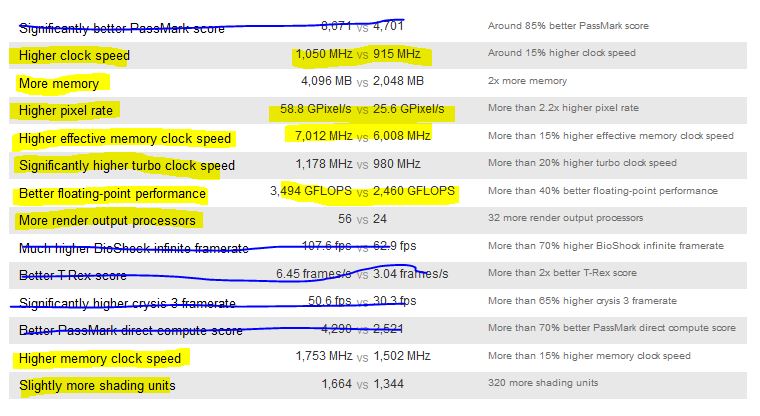
-
Wow... there are people already on phase 8 Way to go.
-
Sad.. I thought the solution was to extract the scripts and install them manually to get the desired results. You wouldn't have control over the scripts and overwrites but you would still have control over the other assets. Anyway Wyrebash is pretty powerful and OBMM is pretty dead simple or so I have been told (most use both together) So yea. In any case it will be great.
-
Support Thread for: A Naughty and Immersive Skyrim
RitualClarity replied to Anatriax's topic in Tutorials and Guides
My suggestion until otherwise told (or verified by yourself) to copy the profile you are using over to be sure the ini transferred. I believe it states it is "universal" however. Reading the OP it appears that it runs it on all the profiles (I believe current profiles) so it should work for your current ones without issues. -
Dev - A Naughty and Immersive Skyrim
RitualClarity replied to Anatriax's topic in Tutorials and Guides
That would be great specially those scripted mods with MO.. Can't get those dam things to work properly I know it must be a simple trick to do it. :). Not as easy to work with as Skyrim -
Dev - A Naughty and Immersive Skyrim
RitualClarity replied to Anatriax's topic in Tutorials and Guides
I will be here during the process of setting this up so I can help you with any issues r/t editing etc as well to keep you on course if you decide there are some simple editing that can be done. for those dong this it is really important that you watch at least one of the videos r/t MO from Gopher and understand how to install the mods and move the files around when doing so. Not too advance but can be confusing for those new to MO. I am installing all of the mods Manually because many of them aren't structured correctly. NO worries.. most are structured fine just you have to click on the "data" folder you find and designate it as the data folder for MO. Easy. (other than the dynDOLOD mod which you need to know how to move the files around) when I am more comfortable I with this tutorial and process I might just show an alternate way for someone to create a custom folder for this step and be able to zip it up and never have to edit or customize the install again. :). Just have to be comfortable with the tutorial and sure that it won't mess something up later. -
Dev - A Naughty and Immersive Skyrim
RitualClarity replied to Anatriax's topic in Tutorials and Guides
Hope all is well for you, They don't like giving those out unless there is a good reason for it. Stick around and shoot the breeze if you feel up to it. Just don't do any major editing. Again if you feel up to it. All is good. So far only minor issues like post where you had 4 listed instead of three. Simple editing issues. I will dump a load of work here for you when you come back.. lol. Just kidding. So far is it massively easier to follow this time. Now I haven't used this method yet. I usually custom master a folder and then zip it up for MO so does this look good (for anyone that has done the tutorial as well to see if it looks correct) because if it does then it might help with those doing this the first time make sure they didn't miss something.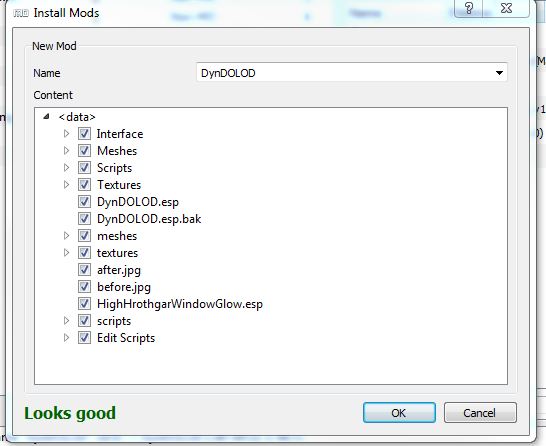
-
Dev - A Naughty and Immersive Skyrim
RitualClarity replied to Anatriax's topic in Tutorials and Guides
Sorry,, I think that was my bad... When I tried to help with moving a thread. Bright side now I know how to. :).. -
Dev - A Naughty and Immersive Skyrim
RitualClarity replied to Anatriax's topic in Tutorials and Guides
might confuse someone as theymight go back and try to find a 4th billboard that isn't there. The current download shows as xEdit for the folder you expand to find the "Edit Scripts" I don't see a TES5Edit Folder. Yes.. I am causing you troubles... lol Reloading my Skyrim again on an dedicated SSD -
Dev - A Naughty and Immersive Skyrim
RitualClarity replied to Anatriax's topic in Tutorials and Guides
I only see three billboards, am I incorrect? -
FalloutNV2016-04-0504-55-42-90.jpg
RitualClarity commented on Jim_UK's gallery image in Fallout 3: New Vegas
 LOL
LOL -
Dev - A Naughty and Immersive Skyrim
RitualClarity replied to Anatriax's topic in Tutorials and Guides
Did this work for your errors? Now is the time to point out those unclear sections. I am sure they are minor with the current version but it is useful to have feedback from someone that is a noob at modding Skyrim to help make this tutorial as good as possible. Of course @Anatriax would take her spin on the suggestions etc. I have moddded Skyrim just not to this point and she took my suggestions and then even beyond working on the other phases that I haven't even gotten to. I am trying to get soem time together to do the complete tutorial as it is currently to gather my thoughts and suggestions to make it even better. Everyone's suggestions can be helpful and useful to help make this as clear as possible a tutorial for modding Skyrim. -
Support Thread for: A Naughty and Immersive Skyrim
RitualClarity replied to Anatriax's topic in Tutorials and Guides
Have patience she is working on some RL stuff and should be able to answer these questions soon. -
Dev - A Naughty and Immersive Skyrim
RitualClarity replied to Anatriax's topic in Tutorials and Guides
I had it once. Never did figure out what caused it. It was on a heavy loaded Skyrim after that I went mostly with textures and limited scripted mods. -
Perfection takes time.
-
Support Thread for: A Naughty and Immersive Skyrim
RitualClarity replied to Anatriax's topic in Tutorials and Guides
@eugenenelson i'd wait for @Anatriaxbefore doing anything to the work you have done. This is an intensive tutorial but intended to be with more powerful graphics cards. The 660TI with 3g Vram should be able to handle it as far as I can tell. Might be some tweaks you missed or need or perhaps there is some other settings that you can do to get the desired results. Worst case, maybe lower textures for the options you have selected and replace them. But wait for her guidance on this. This will happen I am sure as people try to use the tutorial and situations like these are the reason we have the dev forum for this tutorial to discuss and work on the solution and needed tweaks and options as an member goes through the installation of this tutorial. Hopefully she can help you tweaks this so you don't have to use medium settings. -
Dev - A Naughty and Immersive Skyrim
RitualClarity replied to Anatriax's topic in Tutorials and Guides
When you start creating a very complex mod load out with Skyrim, it starts to flake out in the beginning, the best advise is to use the Alternate Start. It is cleaner and easier on the engine. Might even work if you selected the regular start as most of the scripts and setup has already been done. Not sure because I haven't done that in alternate start.