



ritualclarity
-
Posts
3,836 -
Joined
-
Last visited
-
Days Won
268
Content Type
Profiles
Articles
Events
Forums
Gallery
Downloads
Blogs
Posts posted by ritualclarity
-
-
This looks fun! Any ETA on this being implemented?
-
That is what happens when you fuck up your economy. People will start using whatever other item of value even start bartering system again if they must.
-
Cool, If I found TS3 on sale and got it, I'd have a lot of cool stuff to get and use.

-
Seems a bit faster currently. It was getting quite slow to open the page before.
-
20 hours ago, zilvradrow said:
Hello everybody!
After 2 days of exploring the Forum I just discovered this thread here - shame about me
Something about me.
I am a female over 40 year old German and only discovered 2 months ago Skyrim for me. It is a lot of fun to try the adult mods that are available. I am still not very familiar with the modding matter, it is just enough for the outfit studio to use small things for CBBE. I tried carefully Nifskope, CK and Blender, but I am hopelessly overstrained.Is there somewhere a place, where I can ask for specific mods, per example open toe boots?
Thanks for this forum here

Zilvra
Hello, welcome to the site. As for your question on where to post request we don't have a place. With this not being available go to the next best place, Skyrim discussions and open a thread for a request. However like other sites, generally request go unFullfilled unless you inspire someone very much.
So make sure your post is very inspiring.  We do have some here that do have the chops to do what you request if they so decided to.
16 hours ago, Karma199696 said:
We do have some here that do have the chops to do what you request if they so decided to.
16 hours ago, Karma199696 said:Willkommen Zilvra
Glad you found out the thread
don't worry about being late... we have more then 20.000 members but i think that less the 100 found this thread and dropped a line or two... so you already are among the best performers here 
actually at the moment there isn't a request thread (or i never found it)... but i think you could go to the Feedback & Suggestion Forum, in the Site addition suggestion thread and propose that one be created...
again wellcome
Yes, that would also be good for the long term. If enough people here are interested in this then perhaps an additon would be made. However, for the most part many requests end up not being fulfilled as I stated above. I belong to many sites and rarely see some ideas or suggestions taken up by others.
-
 2
2
-
-
Still haven't figured out what the problem was so take care that it don't happen again shortly. Make sure you have a good working copy ASAP of your game etc so if it does go bad later at least you will have a better starting point as I hope currently it is great.
-
1
-
-
Long shot.
Hardware or software problems. Possible virus. You are having problems outside of the game as well
This level one can't really guide someone as really it takes someone being at the computer and with their hands on the beast and trying to tame it.
When you removed everything and started over, you did delete the Steam folder and everyting, correct? There is no chance something was left behind?
Another long shot but makes no sense.
Which language of the game are you using and versions of the mods (language) Sometimes I heard that some had issues with mods in Italy because some of the form ids etc were different. The game is slightly different for various different languages. Another thing that Besthesda screwed up without needing to. Odessa at LL discovered this or at least documented this with another (I assume person from Italy) that there are indeed some different records for different languages beyond just language files.
Quoteadded back my folders, etc... created a profile with just USLEP and LAL worked
Need to be fresh from the start, everything. Something is screwed up and using your old stuff is just going to mess it up again.
Quoterun the game from the profile i was using (with no problem) before all this happened... and the problem was back !!
I had a problem where when I changed profiles from a human to a Kajit etc the dam tail wouldn't work. Couldn't understand it and found it was due to the animations being different from my human profile to my Kajit profile. Re-ran the FNIS each time changing and stopped having this problem. I state this as there can be something being missed that is continuing your issues inside the game folder.
Quoteremoved several mods (Maria Eden, Deviously Helpless, Scent of Sex, and others)... and the problem is still there !!
Because whatever change you had done when you used them is stuck somewhere in the game. Might even be part of a folder not even related to these and left over in the profile or such. You need a "Clean" start from the "start to finish" all mods, scripts everything. Verifying that things work well between each step. Installation, test the game, Script extenders, test the game, Clean MO install, test the game, Base mod, (2or 3) test the game etc, etc. All fresh, all newly downloaded.
We know it worked before properly and only changed recently. So either something became corrupted or an author of one of the items you used changed something that your game doesn't like. (see the reference that different language have different records) Only way to be sure is to completely clean install everything fresh and test often. Will take you a great deal of time. Don't cut corners or you will be bit on the ass for doing it.
-
I don't either.
-
I think you are having problems with your internet. It isn't keeping proper connection/bandwidth. It is flaking out in my opinion. My work sometimes has that happen and they (the tech support office) has to address this.
Have you tried rebooting the router? (Unplugging it and then plugging it back in) Not to be confused with a reset.
-
Just for you Karma

LOL
-
1
-
-
For those that have issues with their Steam game and have been told to Verify the game Cache. This tutorial is geared to help you understand this process. The video covers most of what you will need. You will find it is a simple task and a must to know.
Below is a page with example for those that don't want a video or want / need a different source to help them understand. This is from Steam itself.
https://support.steampowered.com/kb_article.php?ref=2037-QEUH-3335
Finally for those that don't speak English well and understand the subject and have source for how to verify the cache in Steam please add it to the thread and let me know. I can add it to the OP if you wish.
-
1
-
-
Quote
i have no idea of what you mean when you talk about verifying cache
Quote- Restart your computer and launch Steam.
- From the Library section, right-click on the game and select Properties from the menu.
- Select the Local files tab and click the Verify integrity of game files... button.
- Steam will verify the game's files - this process may take several minutes.
Quotedon't understand how SKSE might work if i delete it from the Skyrim folder... do you mean i need to reinstall it ?
Yes after you clean out your folders. You will have to reinstall all your tools.
Having difficulty with some of the info I gave, I'd suggest a pure Nuke and restart/ reinstall. From scratch. Make sure you delete everything in your Skyrim folder left over after uninstalling the game to be sure it is 100% clean before a reinstallation.
-
3 hours ago, Karma199696 said:
thanks, i'll need it
i'll start working on it tomorrow evening.
and don't worry, my game copy is original and valid
I wasn't worried. I am confident that was the case however if others have strange problems that makes no sense and they are using a pirited version they need to understand that these versions have been altered and there is no telling what the changes were and the effect it has on the mods that they choose to use. Hopefully it is just something stuck somewhere in your files etc and can be fixed quickly.
You are using MO i believe you stated. Which means your game folder should be spotless. here is something I do from time to time. I clean out all folders and loose files. Thsi means the SKSE and any other files found in the main folder as well as loose files in the DAta folder.
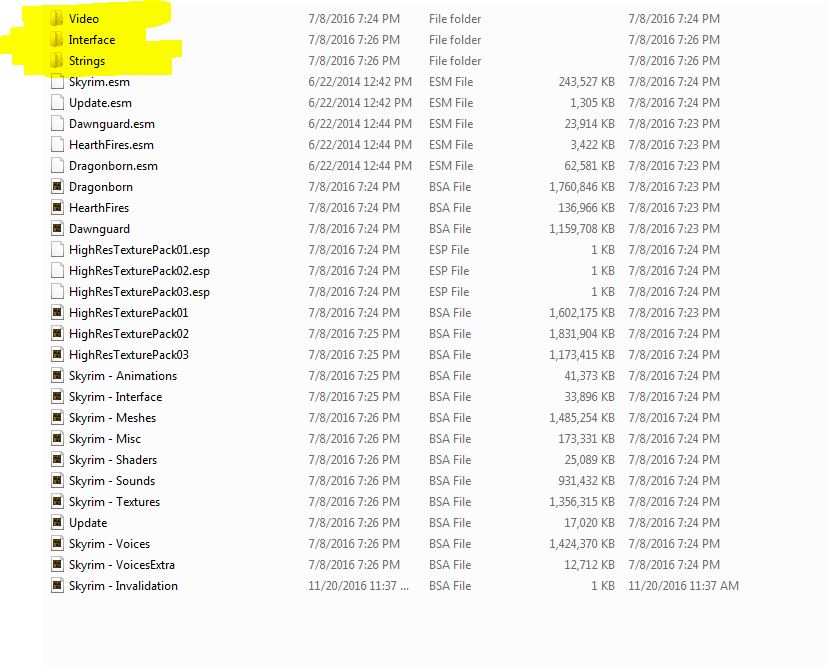
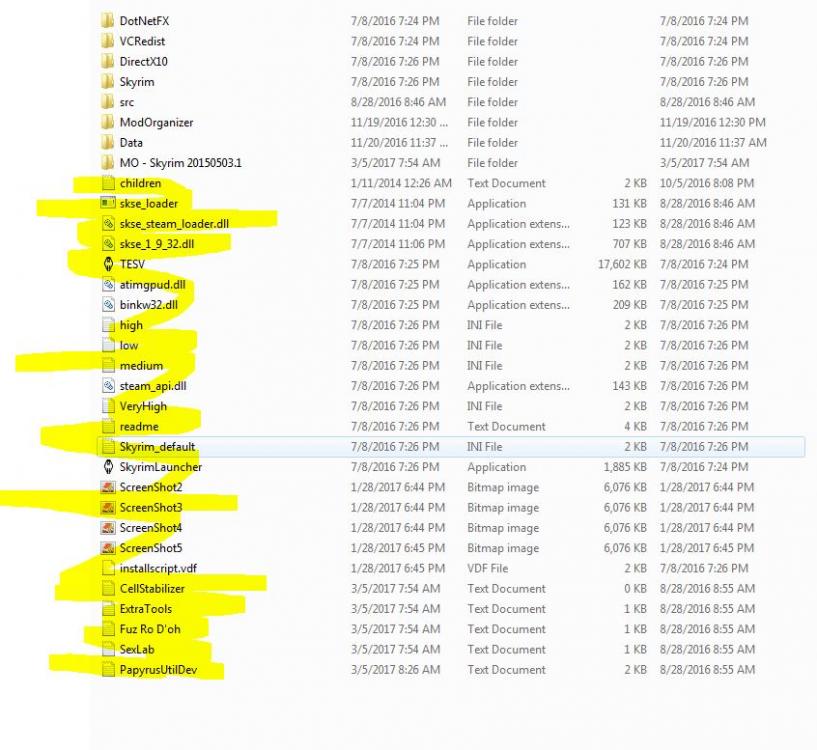
I remove all these highlighted. The main folder just the loose files for the Data folder all files not from the game as well as folders. Verify cache and then I have a pretty clean system. You can if you wish remove all the files from the main folder except for your MO folder, and Data then clean out the data folder to look like what I shown. Verify cache then you should be clear of all issues (supporting programs from the game will be refreshed in case they are bad) Not a full nuke and burn but a reasonable quick check and return to a clean system. (provided you have reasonable internet access/speed)
Basically clean out all but the game esp/esm/bsa files in the Data folder and most if not all of the other files in the main folder. If in doubt toss it out.
Then verify cache used to restore the missing content (reason it isn't the best is sometimes there are files still there that are causing your mod problems. Verify cache only fixes the main game files not the script extenders and other tools or any random lost, or corrupted mod files.
even with Mo as you can see I have an old folder for occasional screwing around in the game, I go in and clean out the files and restore the tools from time to time for a nice crisp game. I can't tell you the last time I had an game related issue that I couldn't trace directly back to a specific mod and it's conflicts.
-
1
-
-
Best of luck Karma.
-
14 hours ago, Karma199696 said:
when i used NMM, every time i started a new game i backed up everything, because using NMM was a real pain (guess where?!)... since i use MO, i only create a new profile and if something goes wrong i revert to the previous profile and everything works again... not this time... now the problem remains even if i remove all the mods

You were good to begin with and for some reason something went wrong. Nothing was added or altered just selecting them in MO. I assume MO was even in the same order with your new game.
Four things I can think of happened,
- Mods or script extender, tools etc gotten corrupted,
- Your game gotten corrupted itself (verify cache through Steam easy check /fix) or some update occurred for your windows (I assume Windows 10) which corrupted something that the game needs or a driver or something etc
- Could be it change something one of the script extenders or other tools used. (That is very unlikely otherwise you would be hearing about this more in the web)
- A change in one of the requirements of the mods you are using.
One question.. .no need to answer (please don't :)) is for some it has to be the actual valid game from Steam. Ripped or pirated games sometimes gives this trouble. I know someone in real life that had a sensless glitch (not like yours but something along the lines, couldn't be resolved) and once gotten the proper game, (he used MO) he was able to play just fine. This isn't directly directed at you but sometimes with tech support this does come up when normal process of resolving issues don't help.
A very long shot is overclocking the processor, Hyperthreading (processor threads and other issues) but doubt that is the case with what you are talking about.
If or when you restore (Nuke and reload) Copy all the game, files and manager etc just in case.
-
1
-
Remove everything and start the game without any SKSE or anything and it should work. you might have a corrupted game or some requirement could be messed up.
perhaps since you have installed and removed mutiple times you might want to make sure you ahve copies of all your mods and nuke the entire installation, delete the folders and anything that remains and start over.
-
If you can add mods and they work. And then keep on adding and fail, change the mods installed to diferent ones and work until you install more mods and fail, likely you have ran into a soft plugin limit. Your computer is choking on the scripts and such being used.
In theory you can add any of those mods that you added last before the game failed when your mod list is low and they will work, Just not with all the others. Any mods can be installed in any of your orders, and they work. ... until you add more. Soft plugin limit. Your computer needs more resources to process the mods you have. Not a conflit or game issue.
-
1
-
-
Thanks Karma you do such a great job on these threads.
-
We finally achieved this. It is amazing and a show that things are going well. We have reached a major milestone of 200000 members.
For the current celebration go to Karma's thread here
Never let the party end
-
Doesn't mean you can't listen to the game music outside of the game :P
-
Any good ones from there you can advise those that are playing this game?
-
Cool,
do you have some links for these mods? Advise for a mod? use them?
-
9 hours ago, JayCrane said:
Howdy all!
Hello, Welcome and have fun!!
-
1
-
-
Maybe a retexture of one of your most popular mods?
Or something along those lines.
even a simple teeshirt that members can have their characters wear and take a screencapture of and post on the celebration thread? lol
It might not be the greatest ideas but maybe something that will spark something.
OH, perhaps a special request for a type of armor etc voted on that thread. WE have voting capabilities with this forum software, correct?
Or we can post more music videos and celebration videos
-
1
-
New features coming to NSFWmods.com agian
in News & Announcements
Posted
I haven't heard of any problems uploading screenshots.
I didn't see a thread for support so I created one here.
@Doublezero
Perhaps we could consider a subforum for supporting the site?
@asenasen
Please post the issue you are having over on the support thread I just created with all the needed info, If you have these screenshots uploaded elsewhere give a link so that Doublezero, Kendo or myself could try to get them uploaded where you want. Sorry for the inconvenience.