



RitualClarity
-
Posts
3,981 -
Joined
-
Last visited
-
Days Won
283
Content Type
Profiles
Articles
Events
Forums
Gallery
Downloads
Blogs
Posts posted by RitualClarity
-
-
18 hours ago, endgameaddiction said:
Currently playing Drive Beyond Horizons. I decided not to post it in the gaming thread because it's full of bugs. Still early access. Similar to beth games as it adds objects with physics. You can imagine how weird shit happens ingame...
Currently editing a video to upload tomorrow or so.
The game itself is linear. It's about driving on a highway and finding parts for your vehicle. There are a moderate amount of vehicles to choose from. You start off with one car, find points of interest and sometimes they will have a vehicle. You can mix parts between vehicles. it uses procedurial generation, but also seeding so that every time you start over, the POI aren't always in the same spots.
Currently these are the vehicles you can use in game. Based off of real life cars. Also a small trailer is added. There are plans for more classic cars. It has about 4 radio stations you can tune into. Those were A.I. generated except for the music as it is produced by their sound designer, akadz.
https://drivebeyondhorizons.wiki.gg/wiki/Cars
Hoping they will add more genres. I would add suggestions, but i don't do discord.
If it is about privacy etc. Then get yourself a disposable email etc. So long as they aren't demanding your actual ID to post on it. (fuck any Discord channel that does that. ) then it should be good. Then you can use that. Create a private browser or better yet use some browser that you aren't currently usinjg. Better yet use a linux machine! lol. (Seriously, this is likely on a gaming machine, so you can virtualize one and then use a vpn even free who cares. They see your post on Discord wop de do. There are ways to do this smart. That is if you are concerned with privacy etc. If you are like FUCK DISCORD (can't blame you there) then nothing you can do.
-
Played a bit of th is

It was Free so no real expectations.
Tomorrow I might play Vampyr

I played this previously when I had XBOX Live. It was included. Now I found it was on sale for I believe 50% (or better.) it was only a couple of bucks with the DLC being 2.99. Not bad.
I needed some console playing time. (I choose console for casual non modable games to sit back and relax. I can't get serious with a controller)
-
I will start.
I recently started playing The Walking Dead. Only played the first episode. (it was free on Xbox).
It is pretty good but can get boring pretty quickly. Didn't have the profound changes due to your actions as I was under the impression that it was going to be. However, There are many episodes and perhaps the choices compound across the many episodes. There were a few changes that were noticeable.
I enjoyed the game but only briefly. Not worth the full price that they had the game at when it was released years ago IMO, but good for free or if you find you like it, 5 bucks or less.

I'm bouncing around and might play a different game today. This episode was very short. Not wanting to pay for the next one, at least now. Maybe later?
-
What Ya' Playin' ?
I'm starting this thread so that people can tell others what they are currently playing. Perhaps, even join an online game with someone else if they desire. Discuss said game that is being played (or popular)
The key concept is what you are currently playing. This will change of course over time.
This thread is also not intended for a review of the game beyond some basics. For a real and proper review of a game, please feel free to create a post on said game, unless one is already created for that game.
PLEASE, IF THERE IS ANY INFORMATION ON ACTUAL GAME PLAY OR CHOICES, PLACE THESE IN A SPOILER SO AS TO NOT SPOIL THE GAME FOR OTHERS.
For those that are new and don't know. Push the icon of an eye, then place your comments or other things inside the box that is created.
Thank You.
-
 1
1
-
-
Check your emails if you are concerned.
-
1
-
-
-
6 hours ago, Doublezero said:
Imagine creating an operating system so unpopular that people in Asian countries are upgrading to Windows 7.


-
6 hours ago, Doublezero said:
I'd rather have Linux problems than Windows problems.

Way smaller problems (generally) than windoze
-
On 9/26/2025 at 2:50 PM, Doublezero said:
It's good that they are doing solid linux testing. Also I agree Bazzite is the best for testing. It is likely the first OS that many moving from Windows (and game) will use. It is also much more easier to get a standard version. It has version control so if there is an issue it is much more easier to revert it than a standard traditional linux system. They just need to let everybody know the version they tested on. Hell they should test with the last 2 or 3 versions of Bazzite IMO.
Those that are like Wendell, or more proficient in Linux already know what to buy in hardware and like he stated can dig depper into the system and get what they want to use. Use the newest just released kernel etc. I for one, if I was having a linux gaming system (which is awesome) would use Bazzite myself. Just easier to maintain so that I can focus on gaming. However, I play mostly Windows games and would need a Windows gaming PC of some level continuing on for the future. I like to mod the game which would also add a level of complexity and I woudn't know if it was my stupid ass doing something wrong or the OS / GAme that is fucked up. Just easier. If I had a gaming system for Linux, I'd install the game there as well and play it (primary gameing system and if had a problem use my Windoze system to play that game. It would make it so I would have to use Windoze less and less.
(Sorry for typos. I am typing on this laptop's keyboard which 1. isn't the same as I am used to and 2. doesn't give as much feedback.
-
Proof that LInux can have issues.
I lost my bluetooth devices. Checking the monitor service it was off. Strange, I didn't turn it off. Trying it, it showed that it didn't have a device. (or driver) but it worked.I updated it (major update) and I guess it lost it. Dam. Had to use an IR mouse (always keep a wired or wireless keyboard mouse handy
regardless of what OS etc you use. ) Anyway. I rebooted it and nothing. I left it for a bit and did my work and poop on my computer for a bit then sat down popped up the terminal (super key+ T) and sudo apt update. Saw that there were some more updates. (didn't see any driver updates but a firmware one) then did the sudo apt upgrade. A couple of minutes later it was done.Rebooted the computer loged on and the bluetooth was auto recognized. All my bluetooth items working without any reconnection etc.
By this time the amount of time I have used this computer I would have been nagged hundreds of times and had at least 5 problems that required my attention not to mention hours of updates to do with the risk that something will be fugged up when it does. Not to mention how much spying Microsloth would have done in the meantime.One other thing if you are using mint, and possibly Unbuntu you would have flatpacks and or snaps. I believe they don't update with the command above. Smart in a way because they are only apps. They don't need to generally be updated as often or as much as the main system (which is suppose to be updated to help provide you security) At least with me regardless of the command to update I still use the app manager to update my flatpacks. (there is a command for that as well but I haven't memorized it yet. )
-
On 9/24/2025 at 7:28 PM, Doublezero said:

I feel that Ventoy is better than rufus or other bootable tool to install Linux. Ventoy can be installed on a larger drive and then just drag and drop the iso into the drive and have it boot and install. I like this as those that start Linux often time want to experiment and use different Linux distros. Having them on Ventoy would allow you to have multiple versions available at a moment's notice.
https://www.ventoy.net/en/index.html
I would suggest that you have two drives (so that you can back up your installation/setup) in case it has any issues.
I have dozens of Linux distros, Windows from 98 through 11, and even Apple! Oh I forgot I have Servers as well (Truenas) and bootable tools (partition manager programs) Will load more
-
5 hours ago, endgameaddiction said:
Wasn't me. But it was a video of Karens getting arrested.\
I think this is it. I think she might have reuploaded it with edited made that were missed. My guess.
Sorry. I meant a video you uploaded was set to private. Thanks for finding a live version.
-
On 9/15/2025 at 10:38 AM, KHL said:
I mean.... I thought ES6 was going to be shit anyway. But now there's no way I'm buying that garbage. Didn't buy ShitField either.
You have the right to celebrate his death. You have the right to comment what your heart's desire. However, others also have the right to exercise their rights of speech etc. They can condemn. They can call for your removal from your job. Furthermore, they have the right to boycott a company that has employees or leaders/ CEOs etc. that say or stand for something that they don't believe in.
-
1
-
 1
1
-
-
16 hours ago, endgameaddiction said:
@endgameaddiction Your video is private.

-
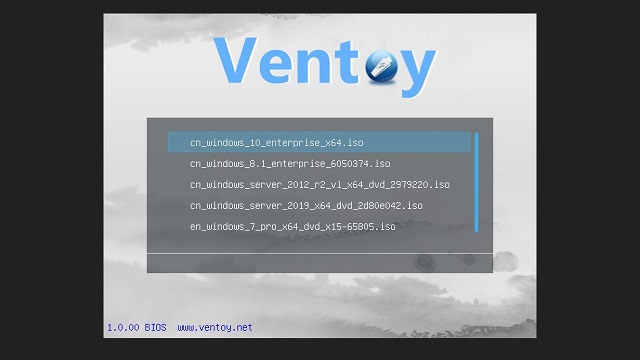
This isn't "Linux" but something that likely will be appreciated by those that have Linux.
It is a program that will set up a USB drive to be able to easily have as many ISO's as you desire. Linux, Windows, Mac, Raspberry Pi and various tools. There are some other formats that Ventoy supports as well. In general, if it boots from the drive like when you install an OS, you should check to see if it works with Ventoy.
I have dozens of OS's and a tool or two on my setup and have used it for some testing and a recent installation of a Linux on one of my testing laptops. It worked flawless. I know some in the tech field, and they stated that Ventoy is good for this as well, and recommended it. (there are other tools as well that do similar things as well)
Ventoy is easy to set up. Download that program and then install Ventoy on the drive. It will erase the entire drive and set up a partition that you can drag and drop the ISO etc. into and once you properly unmount the drive (to make sure nothing got corrupted as it was still transferring data) you can plug into a computer set up the to boot to the drive and see a listing of the various options you have to install or use (in the case of a tool)https://www.ventoy.net/en/index.html
-
 1
1
-
-
Be stupid get fired.
Hundreds of people (at least check almost a thousand people) have been fired if claims are correct. The above is a news article which states specific people and where they worked.
They deserve that. Regardless of what you thought about Charlie Kirk you don't go and publicly celebrate a horrible death.
They sought to silence him. They failed. Instead, they made him a martyr. Protest and vigils are going on around the world in honor of Kirk. People are losing their jobs. The backlash of this cowardly act is strong. His wife came out with a public statement that this will not stop their work. Membership/chapters have massively increased since his assassination.
https://edition.cnn.com/2025/09/13/media/charlie-kirk-erika-social-media-tpusa-followers
I suspect that many that had little to do with him except in passing have started to look more closely at him and his work and decided to listen. Many more joined. Some of which might have been due to the stupid celebrations of the left. I haven't looked much at his videos except in passing but have seen more on him in the past days than I likely have seen in the past 5 years. Shining a spotlight on his discussions.
-
i was floored. Not by the fact that he got shot, but the Shere glee that some of the people around me at work had as soon as it broke. They played the actual fucking snuff clip over and over and over for at least 10 minutes. Each person then chasing down others at work to show that same video. The video of the light going out of his eyes. They celebrated it. They cheered it. Not only that, but they readily, proudly and loudly exclaimed it.
it took almost 30 minutes of the few people that had fucking sense to calm the majority of employees the fuck down and push that celebrating someone being shot in the fucking neck is sick. Those that do it are sick fucks. Regardless of who it was or what they did. Running up to coworkers unsolicited, shoving their phones in their faces showing a snuff clip, isn't something normal people do.
Seriously, one has to teach grown ass adults that they work with about proper activities. Teach them to not shove snuff clips in someone's face while loudly cheering at his inevitable death.
I heard one even comment that that is one down! Then listing the others like Jordan Peters or Ben Shapiro and some other names I am not fully aware of. Acting like it was some BINGO card. Collect them all! sort of bullshit. Wow, just wow. It is one thing to see crazy people on the web I always consider that they are a bit crazy to get the views and make some $$$ it is quite a different thing when they gleefully cheer in person.
-
1
-
-
22 hours ago, endgameaddiction said:
No. It's just the settings.
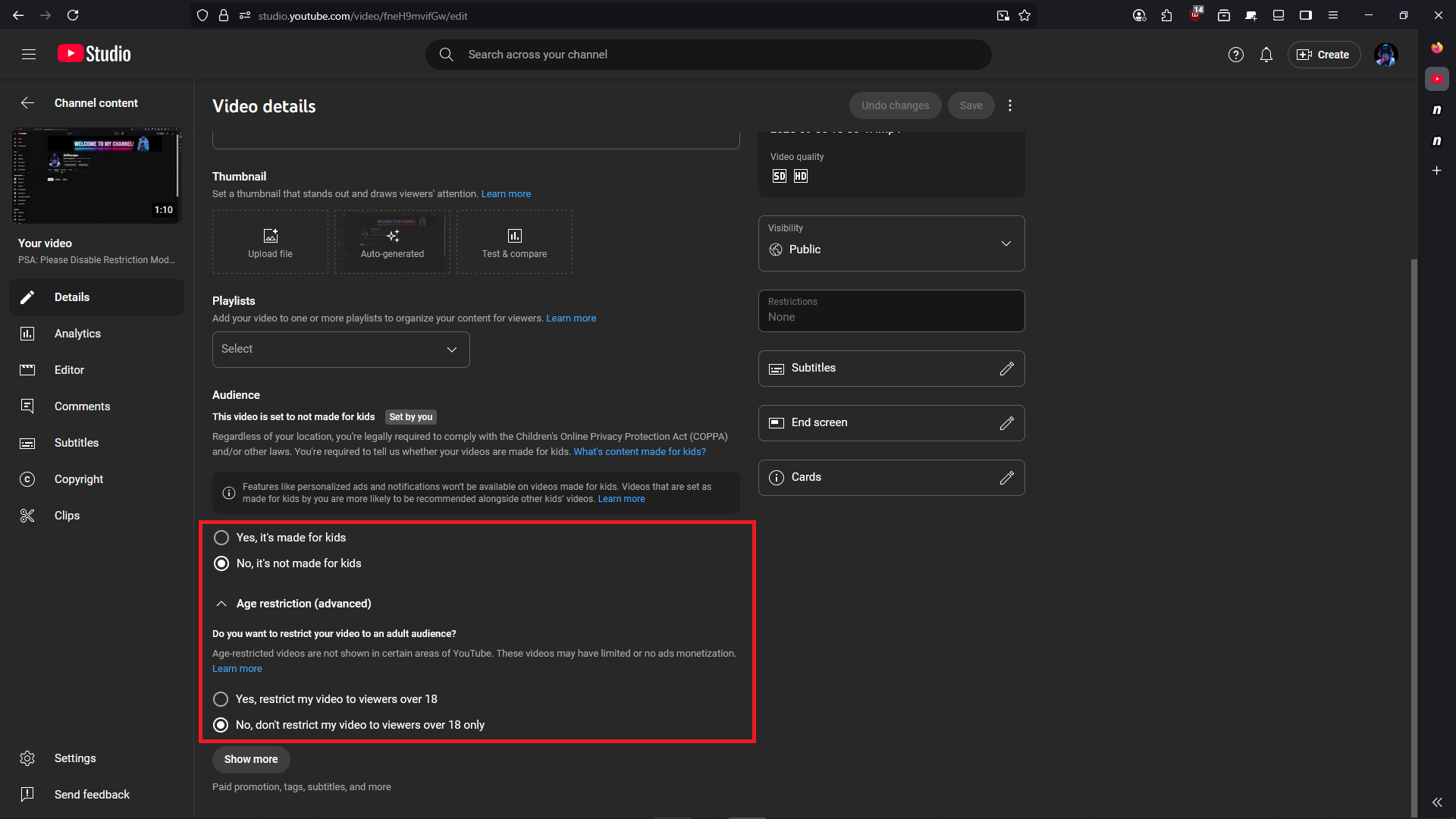
When a content creator uploads a video, you have three options...
- No, it's not made for kids (default)
- Yes, it's made for kids.
- Age restriction (advanced) Yes, restrict my videos to viewers over 18, or No, don't restrict my video to viewers over 18 only (default along with first option)
First option along with "No, don't restrict my video to viewers over 18 only" under Age restriction (advanced) is set by default when you upload a video. These two settings are for mature audience. Videos that do not provide nudity at all, but allow gore and other things that are suitable for mature audience in terms of their policy.
Second option "Yes. it's made for kids" is basically videos uploaded that is made for kids. Content creators are prohibited from uploading any mature content under this setting. Now, it's up to the parents to properly set up their childrens YT account to only view content made for kids. And that means they will only view what is made for kids.
Third setting that is Age restriction (advanced) along with "Yes, restrict my video to viewers over 18" is simply for those who are 18+ because the type of content under this settings could have nudity for educational purposes. This setting is to prohibit those who are considered the age of maturity but are not 18+ to not be able to view these videos.
This isn't happening to me for some reason. NO changing of restriction mode for me. I have tried a few sites including the video above and can see everything.
Turning that on without input from the users is crazy. -
1 hour ago, endgameaddiction said:
Their AI is flagging accounts, not videos per se. Their AI is changing people's restriction modes without some users being aware about the change. In turn, content creators views on their latest videos are tanking not getting the views they normally would get bcause of this. Because their content is being hidden when Restriction Mode is enabled (ON). So they are spreading awareness like myself. This all started back in early August. I guess it's been having more of an affect as of recently. Like the last few weeks or so. So we aren't happy with this because it's hurting our views.
This all has to do with Youtube rolling out their age-verify bullshit and having to show your ID to verify you are old enough to consume mature/adult content.
Ah, there accounts not videos. That is a problem. Not sending them a communication is also a problem. Doublely so.
So do account holders have to have an adult / mature account and a general account now? If so why didn't Youtube indicated that the ACCOUNT would be changed not the videos uploaded.Badly handled in every way. It is one thing that they have to follow the laws and make sure this content is properly managed, quite another thing to screw over people without even a comment or instructions on how to help them continue.
-
30 minutes ago, endgameaddiction said:
It's not that the feature itself is censoring. It's doing it's job. If Restriction Mode is set to ON, then it will restrict mature content as it should. The problem is that other content creators, and perhaps even regular viewers are reporting that YT's AI has automatically switched it to ON. There is no notification or notice upon doing so. So the user is unaware of the change until they find it on accident (or on purpose). If someone that is subbed to my channel gets affected by this, they no longer will see my videos on my channel. Why? Because all of my videos are mature content. A lot of channels will have both, so as shown in the in the first video by Deep Hurmor, when it's enabled, Some videos will get hidden. Those that are flagged as mature or age-restricted by the content creator, or from YT. If it's deliberate, then it's outright censoring content YT doesn't like. If not, then it's their stupid implementation of age verify through ID and Ai implementation with Restriction Mode. Either way it's pretty fucked up because people make a living off of YT and this is hurting them.
Whether it's from getting ad revenue from YT. Or their content promoting Patreon (or the likes), which isn't reaching out to their viewers.
I'm trying to follow but confused.
Is the system flagging things that aren't mature as mature?
Are people claiming something is mature and it isn't but it isn't reviewed properly? -
23 minutes ago, Doublezero said:
Okay, I'm confused. I want to buy 3600 MHz RAM (specifically this ram kit) for this motherboard. From what I understand, this motherboard's RAM can only be overclocked to 3600 MHz. Does the RAM run at 3600 MHz right out of the box, or do I need to overclock it?
Deopening on your setup you might need to go in and do some tweaks to get the full speed and response out of your memory.
https://www.claimdepot.com/settlements/ddr4-and-ddr5-desktop-memory-speed-settlementone company even has a settlement for not "really" having their memory at that speed.
Some youtube videos should set you right.-
 1
1
-
-
12 hours ago, endgameaddiction said:
Wantd to see if it worked. And working it is. So I do believe that people'YT accounts/channel are having it auto enabled and our content is being hidden. Or completely hidden like in my case, which is resulting in a viewership decline.
Fuck you YT!
Indeed!
Have you tried to upload a video on a new account (disposable)? See if they get censored automatically or does it take time.
-
The truth of the matter is exactly what I posted. We were getting hit by spam. They were being placed in old threads. These threads were finished. No activity or signs of interest. People moved on.
It isn't a policy to lock threads that are old. There isn't a time limit as to when a thread would be locked like other sites. They are locked as needed and unlocked likewise. Like now, most are unlocked by @doublezero when he did an update and some maintenance and we been under control with regards to spambots
A simple request to unlock something that a member is interested in is all it takes. The member can post a thread and suggest that it belongs with a locked thread if we are busy at the time and don't unlock it fast enough. We can then merge it to the older thread.
Certain parties just want to cause trouble and argue.
21 hours ago, endgameaddiction said:I think I know @Doublezero, @Kendo 2, @ritualclarity long enough to know that they are the type Admin and moderators very chill and cool to engage with. This site is nearly going to be 10 years and I've been here almost from the start. I can say without a doubt that they don't do shady stuff. If a topic is locked, it's for a reason and they are more than willing to explain why and even go as far as to unlock it. @bjornkis a friend, but my man (or woman?), give them a chance.. Work with them. They aren't your forum enemies. We're all friends here for a good time.
I hope this arguing can be squashed and we can move past it, laugh about it later.
YES. Also note that the entire conversation on the forums is still present and available for those that come to read. Nothing is hidden. Nothing is censored. This isn't what is done at other sites. At least any that I have seen. That would have been seen as a disruption of the thread, and the post after the disruptive point would have been deleted/hidden. We keep as much as humanly possible present to the public so we can be as transparent as possible.
-
3 hours ago, bjornk said:
Some of those threads weren't even a few months old at the time and there were much older threads that weren't locked.
In any case, I think arbitrarily locking threads, unless the person who created it had asked for, is quite disrespectful and a high-handed approach a la "Lover's Lab", which will no doubt discourage people from posting anything.
Yes, I locked old inactive threads. Conversations were completed for that thread. This was months ago.
This was done due to a large amount of spambots posting ... you guessed it … in old threads.
This has been months ago, now you come and complain? Seriously? Why not comment, then?
If there was any thread that was in need to be unlocked, anyone here would be happy to do so. Also, someone could post a new thread and it would just be merged. Not the trauma drama you are trying to make this out to be.
"high-handed approach a la "Lover's Lab"? Seriously? Locking old threads is reaching Lovers's Lab level actions? Lovers Lab bans people because of "drama" that is defined by the moderators. They DELETE threads, HIDE threads and lock ACTIVE CONVERSATIONS. This hasn't happened here. Every thread humanly possible is present to view for all. No hidden editing of people post. No bullshit. Putting this site on the same level simply because of a few old locked threads that had their conversations completed is just the most wild stretch of the imagination possible. Wow… Thanks for the laugh. I really needed it.
-
1
-


What Ya' Playin' ?
in Gaming Discussions
Posted
DC Universe.
I played some more and got to understand the game a bit more so good. But not good. It started to show repetition .. BADLY. Cool stuff is hidden behind pay wals but you can progress reasonably well without much effort. It is also a mash button type of game. NO real game plan etc. I don't play online games so I don't know if that is part and parcel of what that entails.